
Introduction
In modern network infrastructures, service providers and network administrators often need a reliable method to manage and differentiate client devices based on their physical connection point rather than their MAC address. This guide demonstrates how to achieve Dynamic DHCP Pool Assignment via Option 82.
By leveraging DHCP Option 82 (specifically the Circuit ID field injected by an intermediate STA device or relay agent), the central DHCP server can intelligently identify the source of the request. This allows the server to bypass traditional static bindings and dynamically assign targeted IP addresses from a specific pool to any device connected behind that particular station. Whether you are separating subscriber traffic, isolating client networks, or automating deployment, this approach ensures a highly scalable and hardware-independent network architecture.
Topology
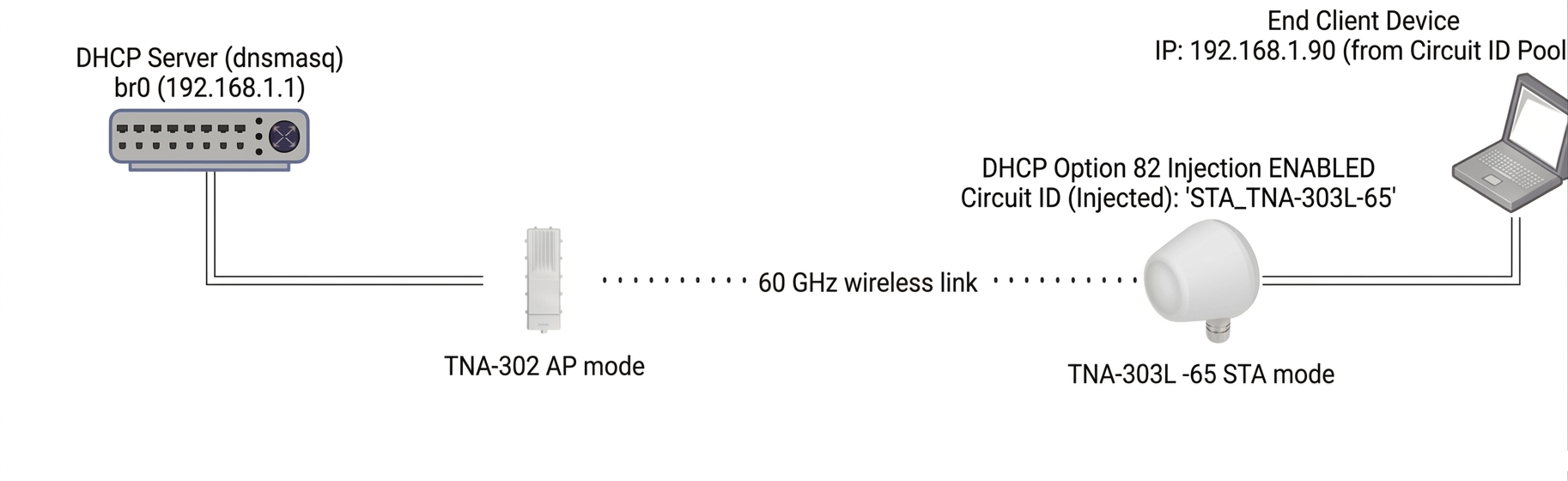
Configuration
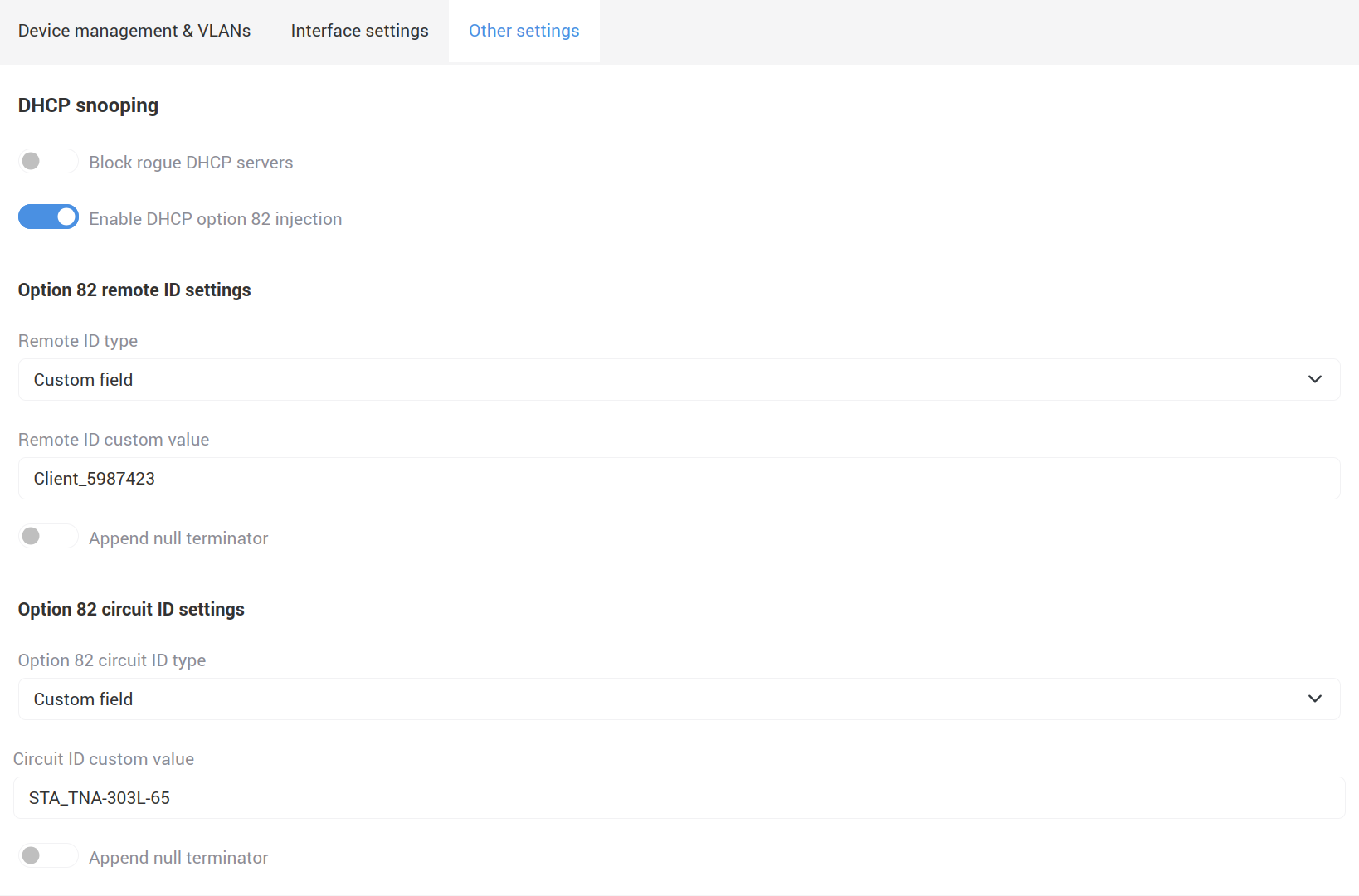
TNA-303L-65
TNA-306L-65 must act as a DHCP Relay Agent and inject the Option 82 fields into passing DHCP requests.
DHCP Server Configuration
Depending on the DHCP server software configuration, you might need to convert the textual Circuit ID or Remote ID into a Hexadecimal string.
According to the DHCP spec, the string payload must be prefixed with the Sub-option type and data length:
01– Sub-option 1 (Circuit ID marker).0f– Payload length (15 characters in Hex).53:54:41...– The Hex values of the charactersS,T,A,_, etc.
Universal Hex Match Pattern: 82:01:0f:53:54:41:5f:54:4e:41:2d:33:30:33:4c:2d:36:35
Open configuration file (e.g., /etc/dnsmasq.conf)
sudo nano /etc/dnsmasq.conf
Apply the following logic to create a dedicated pool based on the Option 82 packet fingerprint:
# --- Global Network Settings ---
interface=br0
no-resolv
log-dhcp

# --- Standard DHCP Options ---
dhcp-option=option:dns-server,1.1.1.1,8.8.8.8
dhcp-option=option:router,192.168.1.1

# --- Option 82 Filtering & IP Pools ---

# Pool A: Dedicated range ONLY for clients behind "STA_TNA-303L-65"
# Matches the raw packet bytes of Option 82 Sub-Option 1
dhcp-range=id:82:01:0f:53:54:41:5f:54:4e:41:2d:33:30:33:4c:2d:36:35,192.168.1.50,192.168.1.90,255.255.255.0,12h

# Pool B: Default range for any other standard devices on the network
dhcp-range=192.168.1.10,192.168.1.40,255.255.255.0,12h
Validate the configuration syntax:
dnsmasq --test
(Ensure it returns syntax check OK.)
Restart the service:
sudo systemctl restart dnsmasq
Testing
Monitor incoming leases in real-time to verify the match:
sudo journalctl -u dnsmasq -f
To see the raw text tags passing through your network without relying on DHCP server logs, run:
sudo tcpdump -i br0 -vvv -s 0 port 67 or port 68
After connecting the device to the TNA-303L-65, lines will appear in tcpdump. Look for the Agent-Information (82) section. You should clearly see the decoded strings:
Agent-Information (82), length 33:
  Circuit-ID SubOption 1, length 15: STA_TNA-303L-65
  Remote-ID SubOption 2, length 14: Client_5987423
Correspondingly, more logs will appear in dnsmasq, but attention should be paid to:
DHCPDISCOVER(br0)
DHCPOFFER(br0) 192.168.1.90
DHCPREQUEST(br0) 192.168.1.90
DHCPACK(br0) 192.168.1.90
The device successfully obtained an IP address from the configured pool based on the assigned Circuit ID.