
Introduction
In modern networking, separating user traffic from device management is a core security and performance best practice. This example demonstrates how to segment these environments using two distinct VLANs:
Data VLAN: Dedicated strictly to end-user devices and their day-to-day network traffic.
Management VLAN: An isolated network reserved exclusively for administrative access (HTTPS) to network devices.
Topology
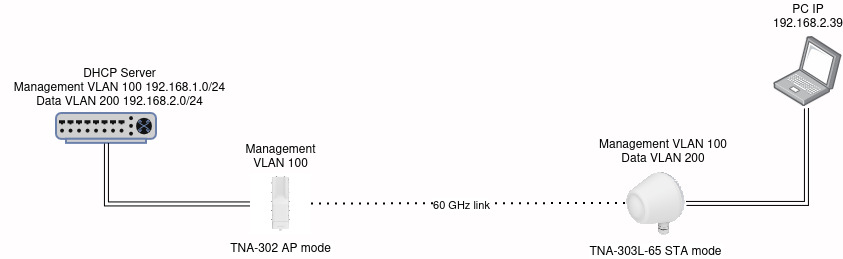
Configuration
A PC running Ubuntu Server is used, which will act as the DHCP server. The TNA-302 will operate in AP mode, while the TNA-303L-65 will operate in STA mode.
Ubuntu Server
For the Management VLAN and Data VLAN, execute sudo nano /etc/netplan/00-installer-config.yaml and add the following VLAN configuration below:
  vlans:
    br0.100:
      id: 100
      link: br0
      addresses: [192.168.1.1/24]

  vlans:
    br0.200:
      id: 200
      link: br0
      addresses: [192.168.2.1/24]
TNA-302
Management VLAN configuration:

TNA-302L-65L
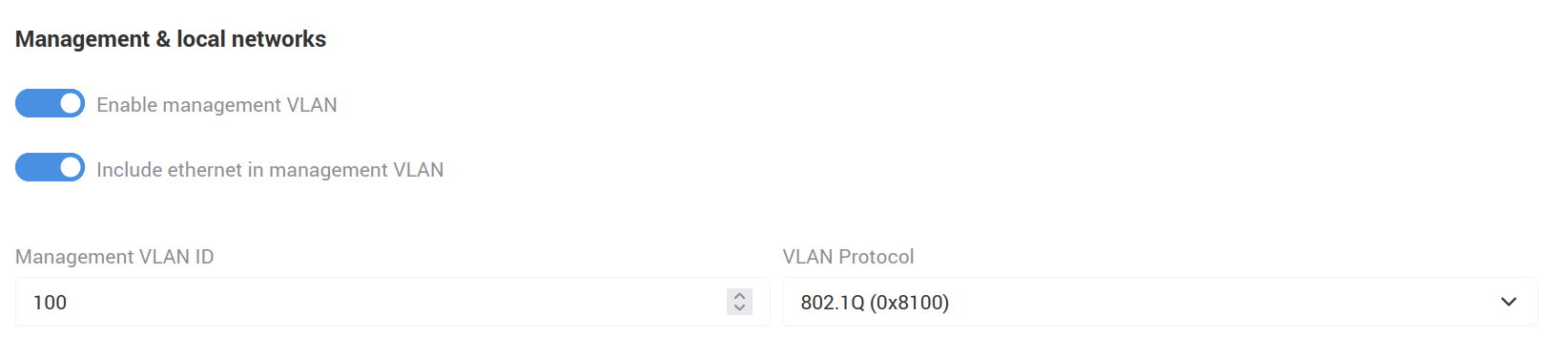
Management VLAN configuration:
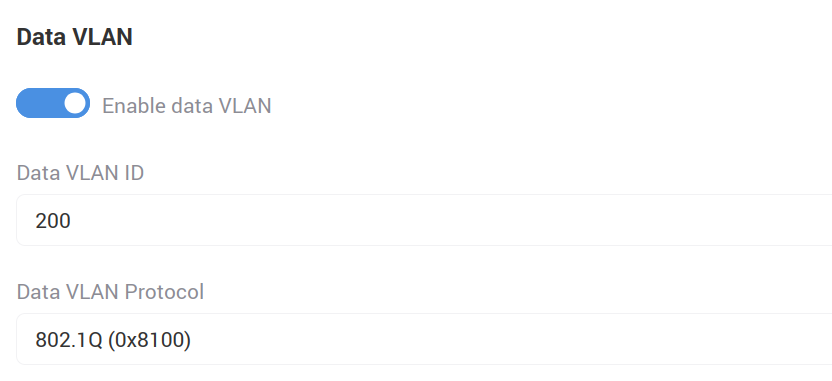
Data VLAN configuration:
Testing
Management VLAN
Send a ping from the Ubuntu Server to the TNA302 Management IP using the VLAN 100 interface:
ping -I br0.100 -I 192.168.1.1 192.168.1.20
TCPdump output:
0:58:40.033276 d2:e1:c2:8b:5e:7c > 78:5e:e8:d0:30:4a, ethertype 802.1Q (0x8100), length 102: vlan 100, p 0, ethertype IPv4 (0x0800), 192.168.1.1 > 192.168.1.20: ICMP echo request, id 40490, seq 1, length 64
10:58:40.033703 78:5e:e8:d0:30:4a > d2:e1:c2:8b:5e:7c, ethertype 802.1Q (0x8100), length 102: vlan 100, p 0, ethertype IPv4 (0x0800), 192.168.1.20 > 192.168.1.1: ICMP echo reply, id 40490, seq 1, length 64
As shown by the TNA configuration, the traffic uses the 802.1Q Ethertype (0x8100) protocol and VLAN ID 100.
When testing with the TNA303L-65, we will see the same result.
Data VLAN
We connect the PC to the STA device and send a ping from the PC to Google DNS 8.8.8.8:
ping 8.8.8.8
TCPdump output:
12:18:37.661616 fc:45:96:41:83:a6 > d2:e1:c2:8b:5e:7c, ethertype 802.1Q (0x8100), length 102: vlan 200, p 0, ethertype IPv4 (0x0800), 192.168.2.39 > 8.8.8.8: ICMP echo request, id 3432, seq 3, length 64
12:18:37.686072 d2:e1:c2:8b:5e:7c > fc:45:96:41:83:a6, ethertype 802.1Q (0x8100), length 102: vlan 200, p 0, ethertype IPv4 (0x0800), 8.8.8.8 > 192.168.2.39: ICMP echo reply, id 3432, seq 3, length 64
As with the Management VLAN, we can see that the packet is tagged — in this case with VLAN 200 and the same 802.1Q Ethertype (0x8100). We can conclude that all data traffic is being carried over VLAN 200.